
As a preferred partner, Flodesk lets you add Email Connectlinks to your newsletters right in the Flodesk email editor, with no Links Toolkit needed. That makes it even easier to identify your Flodesk newsletter traffic!
How to Add Email Connect Links in Flodesk
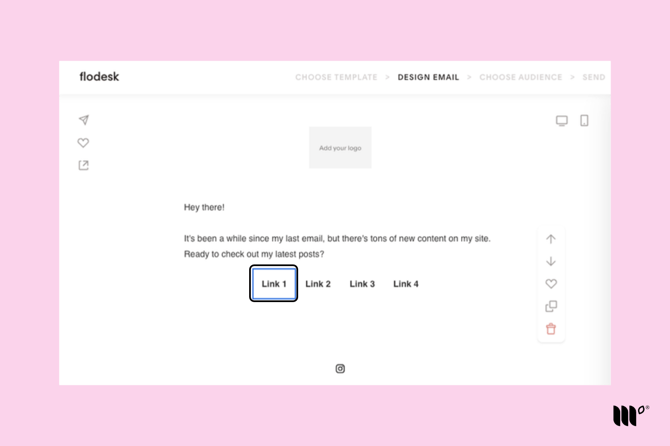
Step 1: While creating an email in Flodesk, highlight the element you'd like to link to a page or post on your site.
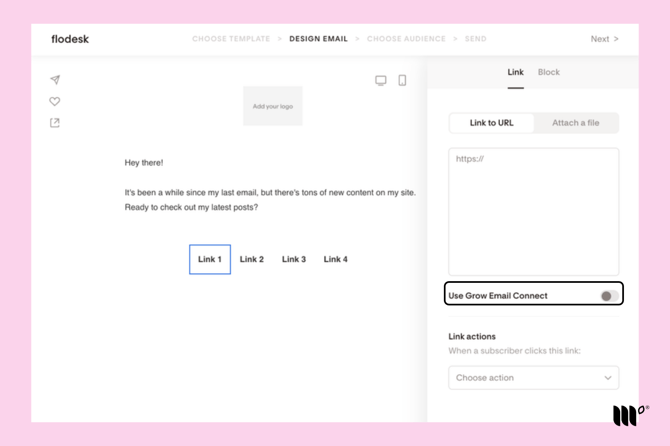
Step 2: In the Link tab in the right-hand menu, turn on the Use Grow Email Connect toggle.
Step 3: Repeat steps 1 and 2 for each post link in your email. This lets us identify readers who click your newsletter links and serve them personalized ads!
Frequently Asked Questions
Do these Flodesk links replace Email Connect links in my newsletter?
Yes! When you turn on Use Grow Email Connect as you create your Flodesk emails, your links are automatically converted to Email Connect links. You don't need to build them by hand or copy them from the Links Toolkit.
When should I use the Use Grow Email Connect setting in Flodesk?
Use it for any link in your Flodesk emails that sends readers to posts or pages on your website. This lets us identify your newsletter traffic as it arrives on your site.
You don't need to use it for links to social media or anywhere other than your site.