
How Email Connect Works
An Email Connect link is your post's short link plus your Email Service Provider's email tag. When subscribers click it in your newsletter, we can identify them on your site, which can mean higher CPMs.
Want the link built for you instead? Use Links Toolkit.
Step 1: Copy Your Short LinkInstead of copying the link from your browser's address bar, open the Save & Share menu on your post and click Copy Link.
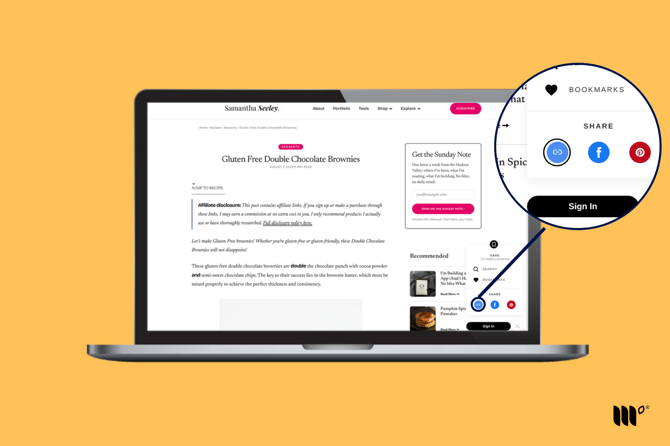
Paste your short link into your newsletter, then add your Email Service Provider's email merge tag right after it. Don't copy these examples! Use your own short link.
|
Email Service Provider |
Email tag |
Email Connect link |
|---|---|---|
|
Kit |
/e/ |
[your short link]/e/ |
|
Mailchimp |
/e/*|EMAIL|* |
[your short link]/e/*|EMAIL|* |
|
MailerLite |
/e/{$email} |
[your short link]/e/{$email} |
|
Flodesk |
/e/ |
[your short link]/e/ |
|
BirdSend |
/e/%contact.email% |
[your short link]/e/%contact.email% |
|
ActiveCampaign |
/e/%EMAIL% |
[your short link]/e/%EMAIL% |
|
Beehiiv |
/e/ |
[your short link]/e/ |
Repeat for each post you link in your newsletter.
Frequently Asked Questions
Why don't my Email Connect links work when I add them to my newsletter?
If you build your links outside your newsletter editor, copying and pasting can mess up the formatting, especially in a rich text editor. Build your links in a plain text editor or right in your newsletter editor.
Why isn't my Email Service Provider listed?
We've tested and verified the Email Service Providers above. Others may work, but they haven't been verified. Let us know which one you'd like by clicking Share Feedback in the Publisher Dashboard sidebar.
Where do I put these links?
Use them in place of the URL you'd normally copy from the address bar. Add them to your email draft the same way you'd add any link.