
Mediavine’s Recommended Content widgets surface recommendations to your users on your site based on their browsing history and preferences.
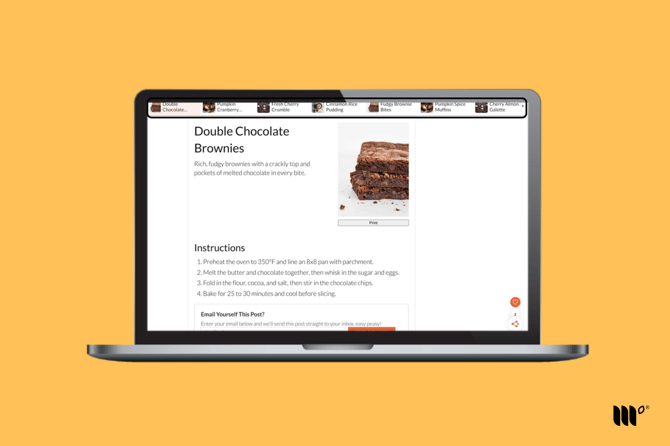
The Header Carousel widget appears at the top of your site.
It will display upon exit intent - in other words, as the reader begins to scroll up the post. This widget will display recommended posts to the reader with the purpose of keeping them engaged and on your site for longer.
The Header Carousel widget is only available on desktop devices.
How to Enable the Header Carousel Widget
Step 1: In your Publisher Dashboard, go to Tools > Recommended Content.
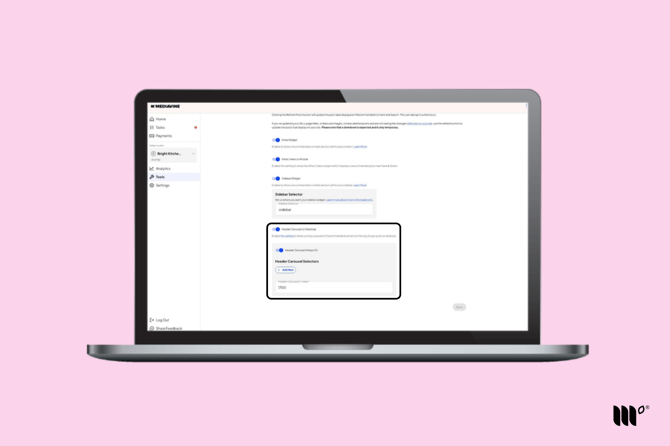
Step 2: Toggle on the Header Carousel on Desktop setting.
Step 3: Leave the toggle on for the Header Carousel Always On setting, if you'd like the header carousel placement to display not only on exit intent but also once the reader begins scrolling.
If you're having trouble seeing the Header Carousel, you may need to identify a Header Carousel Selector.
How to Disable the Header Carousel Widget
You can disable the Header Carousel widget by toggling it off in Tools > Recommended Content. You do not need to specifically toggle off the Always On setting. Disabling the Header Carousel will disable all of its related settings.
To disable the Header Carousel widget on a single post or page, check out this article.