Now that you've set up your Exclusive Content widget(s), you'll need to add them to your site!
You can implement Exclusive Content a few different ways, depending on what you're locking: recipes, printables, patterns, packing lists, meal plans, workouts, tools, guides, and more.
Exclusive Content is a legacy tool only available to publishers who used it before Grow became Tools in November 2026.
- Locking an image or PDF? Add a CSS class to an element on your website.
- Locking a Create card? Add a CSS class to an element on your website.
- Locking a whole page, a block of text, or a few blocks of content? Use the Manual Placement option to wrap that content in HTML.
- Not using Gutenberg or WordPress? You'll likely need to use the Manual Placement option.
Option 1: Add a CSS class to an element on your website. This is the best way to lock images, PDFs, and Create cards.
- Learn how to use the CSS method.
Option 2: Manually place the Exclusive Content widget code in your site's HTML editor. This is the best way to lock a whole page, a block of text, or multiple blocks of content. It's also the method to use if you aren't using Gutenberg with WordPress.
- Learn how to use Manual Placement.
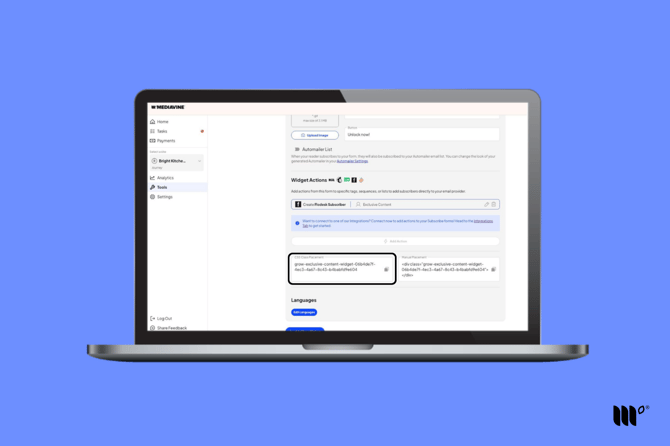
You'll find both codes at the bottom of each widget in Tools > Exclusive Content in your Publisher Dashboard.
The area you're locking needs to be tall enough for the Exclusive Content widget to cover it. We recommend the element be at least 500px tall. A single button or a very short image won't work on its own.
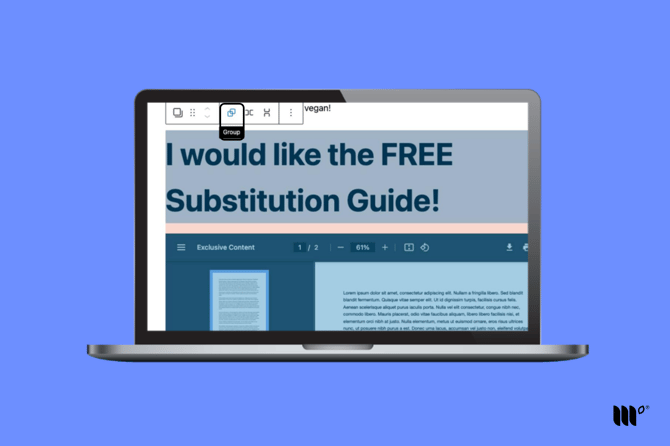
To lock a single button or very short image, add another image to create more space, then group those blocks together in WordPress and apply the CSS class to the grouped block.
- Note: Gutenberg File blocks only show the PDF preview on desktop and use a text link on mobile devices. This makes the File block too small to lock on mobile. Putting your File block inside a Group block can solve this!
To group blocks in WordPress, hold down the Shift key while selecting them, then choose Group.