-spacing.png?width=385&height=100&name=mediavine-horiz-white-pn-RGB-(r)-spacing.png)
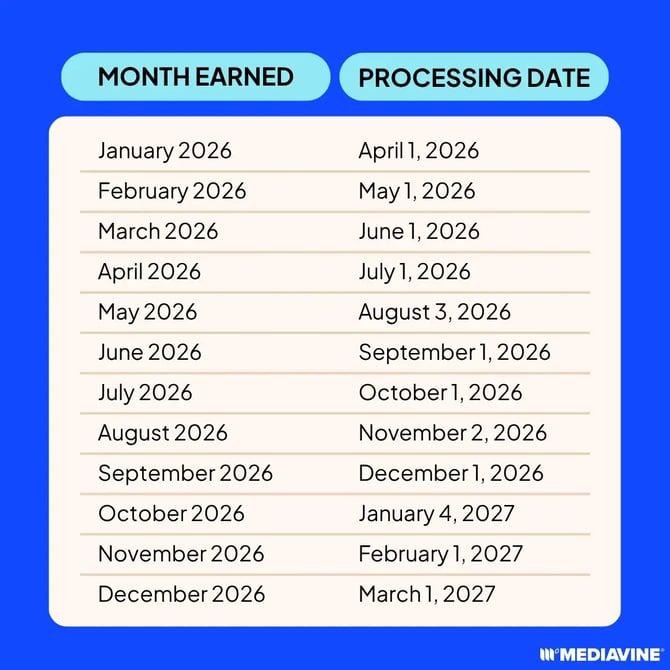
Mediavine pays on a NET 65 basis, which means 65 days from the end of the month that money was earned.
Payments will be processed on the first business day of the month. For example, all money earned in January will be processed on the first business day in April.
Please note that processed means your payment has been submitted through our payment processor. Depending on your payment method, bank, country, currency, weekends, or holidays, it may take a few additional business days for the funds to appear in your account.
I received a payday email, but I don’t see the money yet
If you received a payday email or your payment shows as processed, that means Mediavine has started the payment process through Tipalti.
Depending on your payment method, bank, country, currency, weekends, and holidays, it may take a few additional business days for the funds to appear in your account. Payments may not post immediately on the processing date.
How can I check my payment status?
You can check the status of your payment in your Mediavine Dashboard by going to Payments > View Payments > Payment History.
If you see a status like Processing, Submitted, Paid, Rejected, or Deferred, those statuses can help explain where your payment is in the process.
For a full breakdown of each payment status and what it means, please see our FAQ: Payment Status article.
Why didn’t I receive a payment this month?
If your unpaid balance has not reached the minimum payout threshold, a payment will not be issued for that cycle. Your balance will automatically roll over and continue to combine with future earnings until it becomes eligible for payout.
For most publishers, the minimum payout threshold is $100 USD. Thresholds may vary depending on your selected payment method and currency.
Note: If you do not see a payment listed in your Payment History for a specific cycle, this usually means a payment was not submitted for that cycle. In most cases, this is because the minimum payout threshold has not been met.
Can changes to my payment information delay my payment?
Yes. For security reasons certain updates to your payment profile may require additional review by Tipalti before payment can be released.
This can include changes to your payment method, bank account, address, name, business information, tax information, or payment country.
If your payment profile is under review, your payment may be temporarily delayed while our payment partner verifies your information. This review helps protect Publisher accounts and ensure payments are sent to the correct person or business.
How are payments made?
Mediavine publishers have the option of several payment methods via our partner, Tipalti. You may be subject to some fees based on the payment method you choose.
You can review all the payment methods here. For more information about Mediavine's payment options, please see this guide.
Got questions? Please email payments@mediavine.com.