-spacing.png?width=385&height=100&name=mediavine-horiz-white-pn-RGB-(r)-spacing.png)
What is it?
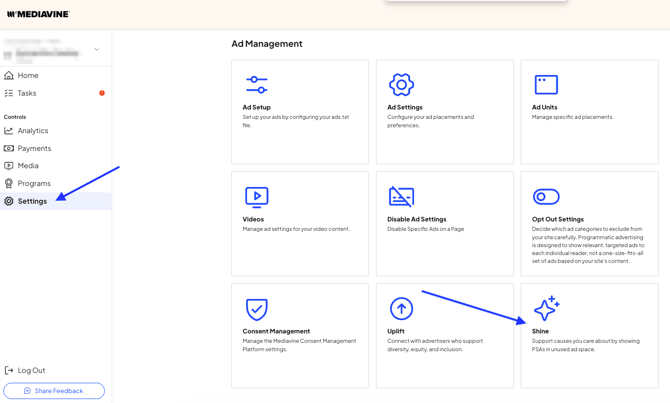
Mediavine public service announcements (PSAs) can be enabled in your dashboard from the Settings tab, and clicking on the option for Shine.
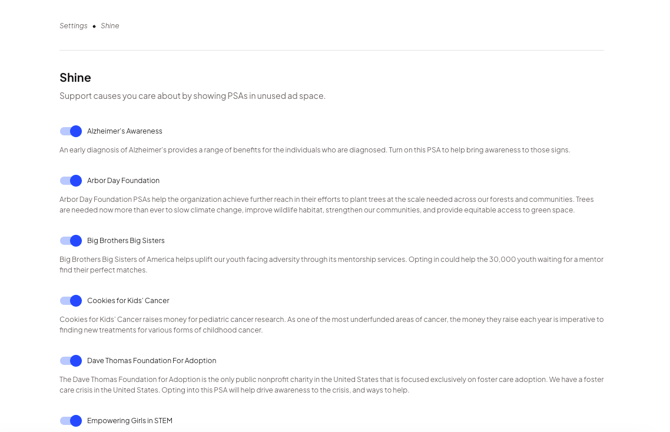
On the next screen, you are shown a list of PSA's available for opt-in. Doing so automatically shows your readers the Public Service Announcement creatives of your choice in your unfilled ad inventory.
What do the ads look like?
PSAs will follow the same guidelines for sizing and placement as paid ads on the site. We also require the same quality standards.
Example Ad:
What happens when people click the ads?
If clicked, readers will be taken to a landing page on the non-profit organization's website. Each landing page has information and links to reliable, up-to-date sources that have been reviewed by our team.
How can I enable PSAs?
In your Mediavine dashboard, from the Settings tab, select Shine. This will take you to a list of available PSA options, where you can toggle on any of interest.
Are there any potential consequences of enabling this feature?
No. This option will only be used for unfilled ad space. Mediavine does not fill at 100%. It's better for earnings and overall performance, as well as quality, when it comes to the inventory you serve.
Can I customize the creative/link/landing page?
Not at this time.